Store locator examples: 6 brand pages and the traits they share
Six real store locator and stockist pages, visited on September 18, 2026: what each one does well, what you could add if you borrow its layout, and the traits they share.
A store locator page answers one question: where can I buy this near me. Most brands answer it with the same building blocks. The differences sit in the details: how search works, what each result shows, and what happens when there is no store nearby.
Below are six real pages, each visited and captured on September 18, 2026. For each one you get what the page does well and what you could add if you borrow its layout. The last section pulls out the traits they share, so you can check your own page against them.
Where these examples come from
The six brands sell seafood, soda, snacks, broth, shoes and wellness products through their own stores, retailers and online shops. Two of them (Fishwife and Maude) use the same third-party widget, Stockist, and one (Rothy's) runs its map on Google Maps.
If you want a larger sample, Baymard Institute keeps a gallery of 109 store locator design examples.
1. Fishwife: a stockist list next to a clustered map
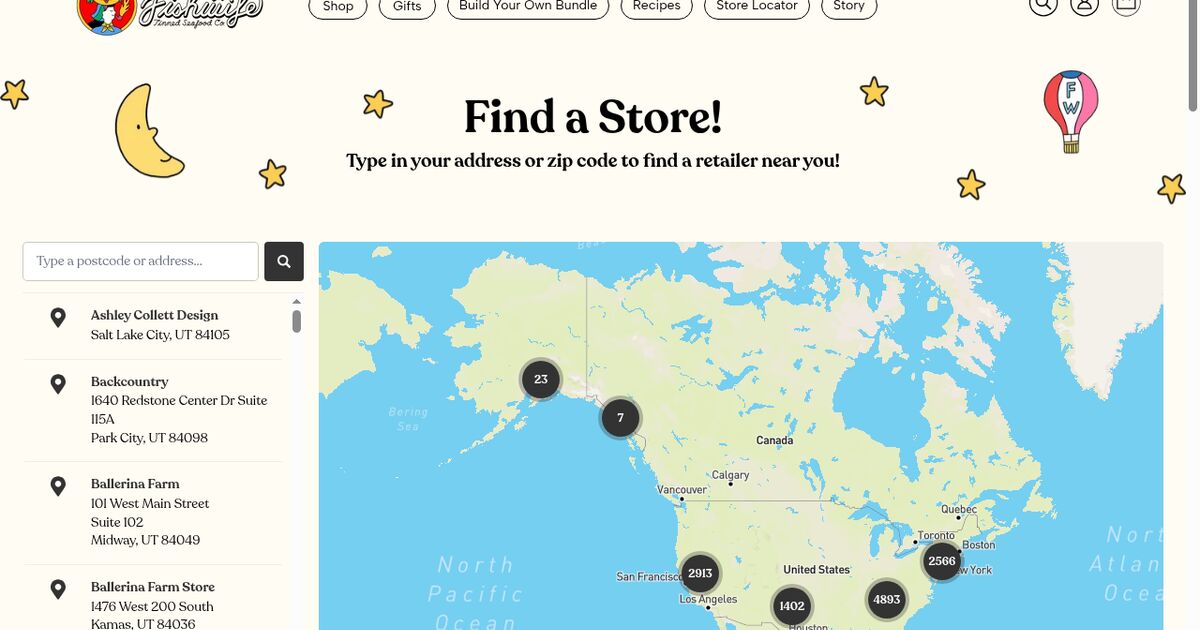
Fishwife sells tinned seafood. Its page opens with the heading "Find a Store!" and one line of instruction: "Type in your address or zip code to find a retailer near you!" The search field repeats the idea in its placeholder, "Type a postcode or address...".
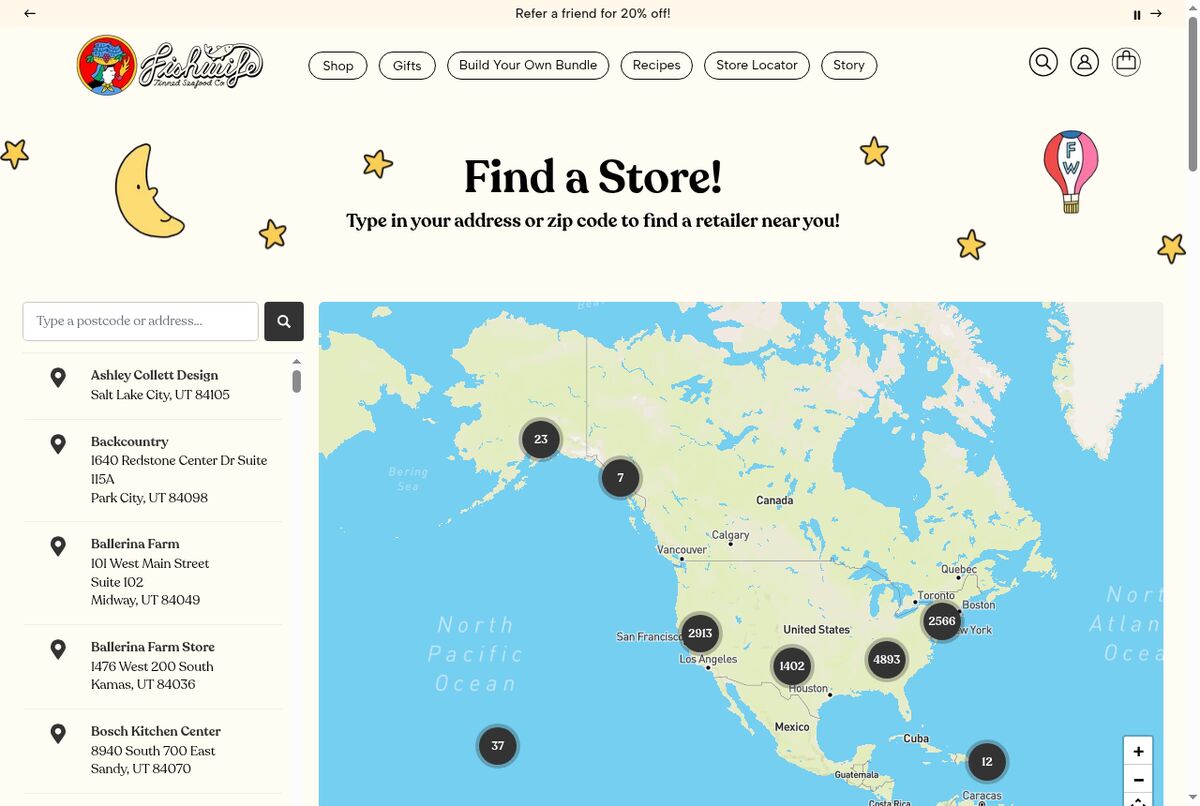 Fishwife's store locator, built with Stockist. Source: eatfishwife.com, captured September 18, 2026.
The layout is the classic split: stockists listed on the left with name and address, the map on the right. Over North America the pins group into numbered clusters, so the map stays readable with many retailers on it. Under the locator, a carousel of retail partner logos sits below the heading "where to find us in RETAIL STORES". Visitors see which chains carry the product before searching.
If you copy this layout, you could pair it with a distance on each result and a current-location link, two traits you will find on the Maude and Rothy's pages below.
2. Rothy's: a fallback when no store is nearby
Rothy's sells shoes and bags. The headline reads "Find your store or retailer.", followed by a field labelled "Search by zipcode, city, or state" and a "Use Current Location" link. A large photo of a Rothy's storefront shows visitors what the shops look like.
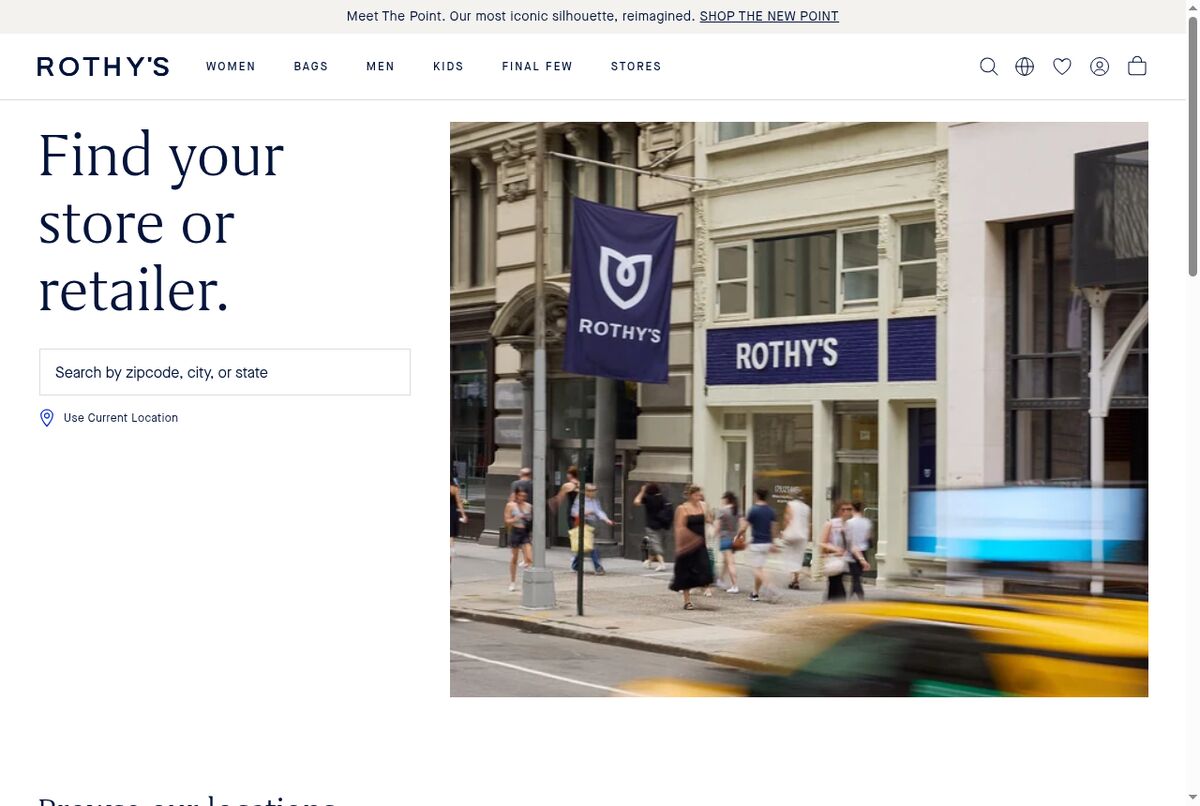 Rothy's store finder. Source: rothys.com, captured September 18, 2026.
The detail worth copying is the empty state. When no store is within reach, the page says "No stores located nearby" and offers "Browse our locations.", a link to the full list. The visitor never hits a dead end.
The map runs on Google Maps. One option on top of this fallback: point visitors who live far from any shop toward buying online, as Kettle & Fire does further down.
3. Maude: distances and an Online checkbox
Maude sells intimacy and wellness products through retailers in several countries. Its hero reads "find us across these retailers and countries near you.", then a second block, "more places to find maude.", holds the search field and an "Online" checkbox.
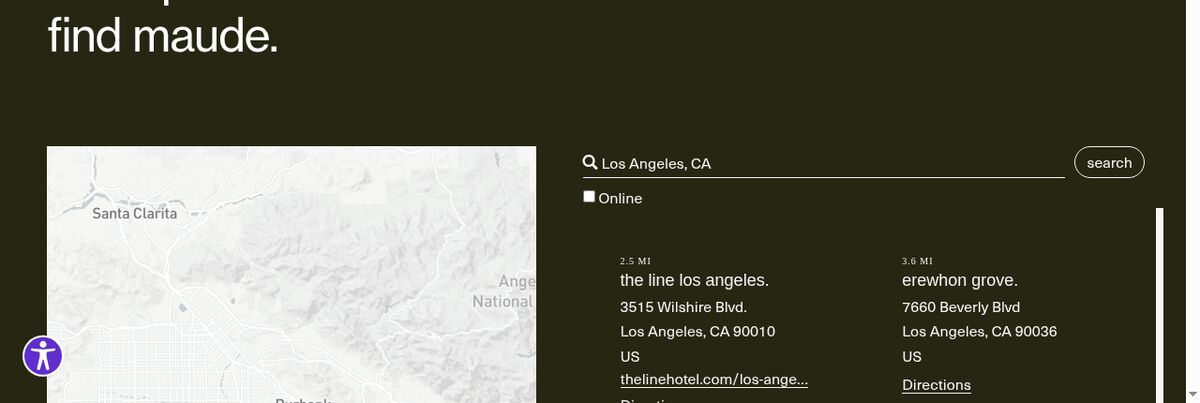 Maude's stockist search for Los Angeles. Source: getmaude.com, captured September 18, 2026.
A search for "Los Angeles, CA" returns stockists with their distance in miles: "the line los angeles." at 2.5 MI, "erewhon grove." at 3.6 MI. Each result shows the address, a link to the stockist's website and a Directions link.
The Online checkbox is the small idea to borrow. One control lets visitors switch between shops they can walk into and retailers that sell online. If your stockists keep regular hours, showing whether each one is open right now would be a natural extra field on a page like this.
4. OLIPOP: product filters and an online tab
OLIPOP sells soda, and its "Where to Buy OLIPOP" page lets visitors filter by product: Category, Flavor and Product. A search radius of 10, 25 or 50 miles controls how far the results reach.
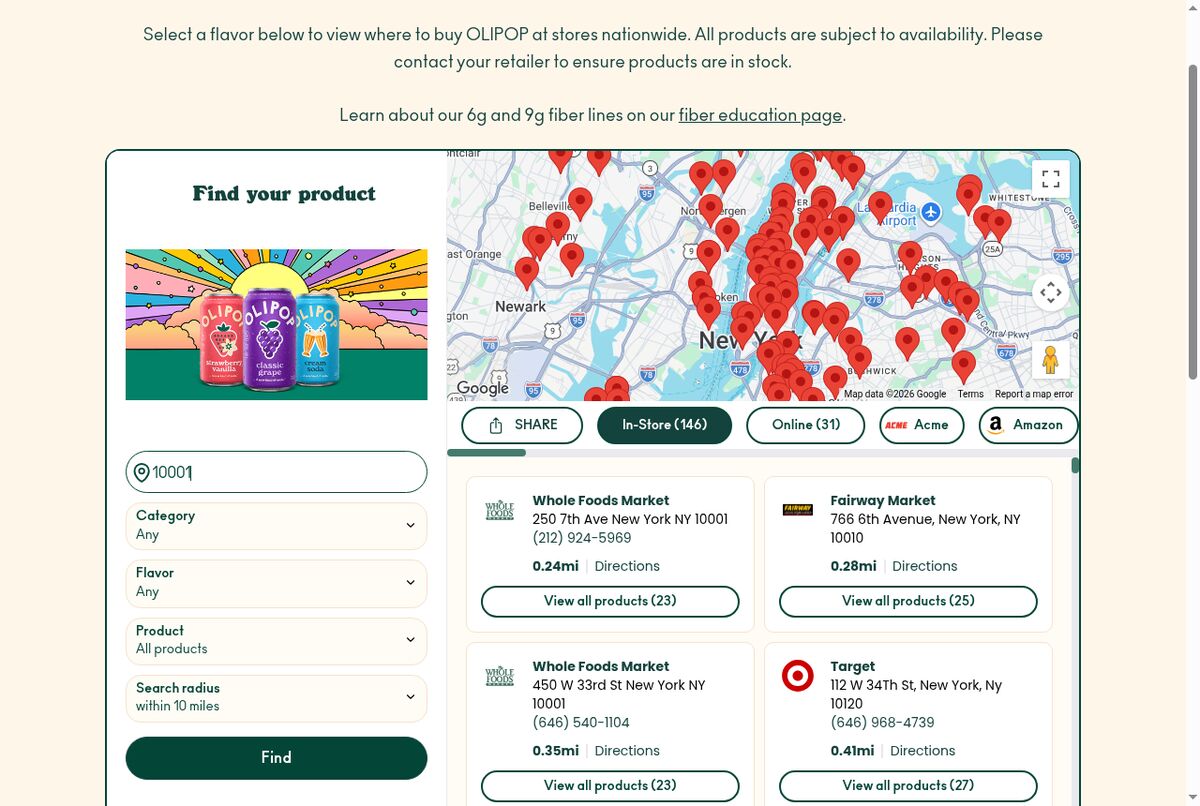 OLIPOP's Where to Buy page. Source: drinkolipop.com, captured September 18, 2026.
For zip code 10001, the page split results into two tabs: In-Store (146) and Online (31). Each card shows the distance, a phone number, a Directions link and "View all products". Of the six pages, this one gives visitors the most ways to narrow the list. Our guide to building a where to buy page on Shopify breaks it down in detail.
With this many filters, keep a way to clear them close to the results, so a visitor who narrows too far can start over in one tap.
5. Partake Foods: store and online side by side
Partake Foods sells cookies and snacks. Its Find Us page leads with a line of social proof: "11,000+ Retailers Are Totally Sweet On Us". Two tabs, "Find a Store" and "Buy Online", separate physical shops from online retailers, and a "Product Finder" helps visitors look for a specific item.
Putting the retailer count in the headline tells a first-time visitor the product is widely stocked before they type anything. A smaller brand could take the same approach with names instead of a count, the way Fishwife shows retailer logos.
6. Kettle & Fire: a disclaimer and a delivery option
Kettle & Fire sells broth. Its locator page includes an availability disclaimer, which helps shoppers set their expectations before they make the trip.
For visitors who would rather have the broth delivered, the page offers a subscription on the brand's own site: "Subscribe & save 20% off for life". If you sell direct as well, the locator page is a fair place to say so, especially next to the message a visitor sees when no shop is close.
Traits the six pages share
Put side by side, the six pages share a short list of traits. Each one appears on at least one of the pages above.
| Trait | Where you saw it |
|---|---|
| Search by zip code, city or address | Fishwife, Rothy's, Maude, OLIPOP |
| Current-location option | Rothy's ("Use Current Location") |
| Results listed next to the map | Fishwife |
| Distance on each result | Maude, OLIPOP |
| Directions link | Maude, OLIPOP |
| Availability disclaimer | Kettle & Fire |
| Separate online tab or filter | OLIPOP, Partake Foods, Maude |
| Product filter | OLIPOP, Partake Foods ("Product Finder") |
| Fallback when nothing is nearby | Rothy's (full list), Kettle & Fire (direct purchase) |
The first five rows cover the basic journey, from "is there a shop near me" to arriving at the door.
The next rows depend on how you sell. If retailers sell your products online, an online tab keeps them apart from shops a visitor can walk into. If retailers carry different ranges, a product filter saves a wasted trip. And every page benefits from an answer for the visitor who finds nothing nearby: a full list of locations, or a way to buy directly.
Building your own
Before you pick a tool, go through the table and mark the rows that apply to you. A brand with a handful of its own shops needs search, distance and directions. A brand sold through many stockists will also want the online tab and, if ranges differ, product filters. The step-by-step guide to adding a store locator to Shopify covers the setup options.
Then test the page on a phone twice: once with a zip code from a city where you have a store, and once with a zip code where you have none. The second test shows you your empty state.
Locastore covers most of that table inside a Shopify storefront: address search, a "Near me" button, distances in kilometres or miles, an open/closed badge computed from your opening hours, tag filters, marker clustering and one-tap directions in Google Maps. The map runs on OpenStreetMap, with no Google Maps API key, and the Free plan covers up to five locations.
Frequently asked questions
What should a store locator page include?
The six pages in this article point to the same base: a search field that accepts a zip code, city or address, a current-location option, a list of results next to the map, a distance on each result and a directions link. Brands whose retailers also sell online add a separate online tab or filter.
What is a stockist page?
A stockist page lists the shops and retailers that carry your products, as opposed to stores you run yourself. Fishwife and Maude both use this format, with a search field and a list of stockists showing each address.
Store locator by zip code: how should search work?
The visitor types a zip code, city or address and gets nearby results with the distance to each one. OLIPOP lets visitors pick a radius of 10, 25 or 50 miles, and Rothy's shows a message plus a link to the full list of locations when nothing is nearby.
Should a store locator show online retailers?
If retailers sell your products on their own websites, showing them helps, as long as they sit in a separate tab or filter. OLIPOP uses In-Store and Online tabs, Partake Foods has Find a Store and Buy Online tabs, and Maude offers an Online checkbox.